FIXD OBD2 Scanner
- 4.1
- Rating
- 1.00M
- Installs
- Free
- Price

 Analysis by App-foxy
If you are buying a used car, trying to understand a dashboard warning, or simply tired of guessing what a strange engine sound might mean, FIXD OBD2 Scanner is the kind of app I would keep in mind. It belongs to the Auto & Vehicles category and is made by FIXD, with a simple idea behind it: connect a compatible OBD2 scanner to the car, open the app, and turn an intimidating warning light into information you can act on.
My first impression is that it is most useful as a translator, not as a replacement for a mechanic. That distinction matters. The app can help you understand what your vehicle is reporting, organize your next question, and decide whether a problem looks urgent enough to stop driving. It cannot physically inspect a belt, hear a failing bearing, test every mechanical component, or guarantee that a fault code identifies the exact failed part.
The app is free to install, is rated for Everyone, and has reached over a million installs. Its average rating is 4.2 from around 29 thousand ratings, which gives a useful picture: many drivers find the basic idea valuable, but this is not a magic diagnosis tool that removes every uncertainty. The current version is 26.3, and it runs on operating system version 10 or later.
You May Also Like

 Blood Strike: 2.5 Anniversary
Blood Strike’s Loadouts Turn Every Drop Into a Tactical Gamble
A close look at Blood Strike’s custom loadouts: how fast access to signature weapons reshapes its battle royale rhythm, rewards preparation, and narrows the gap between fights.

 Pandora - Music & Podcasts
Pandora’s Music Is Easy to Start, but Harder to Recover
Pandora’s strength is its low-effort path from a seed to a station. Its weak spot is how much confidence it asks you to place in connection, setup, and quiet recovery.

 8 Ball Pool
 Is Built on Rivalries, Rematches, and Routine
A close look at the rivalries, rematches, shared routines, and unanswered safety questions that turn a quick pool match into a persistent mobile community.

 Samsung Music
’s Quiet Strength Is Playing What You Already Own
Its reach comes less from spectacle than from dependable access to a personal library. That simplicity is both the app’s strongest retention engine and its ceiling.

 AccuWeather: Weather Radar
AccuWeather Review: A Quick, Clear Forecast for Everyday Decisions
For everyday plans, the best forecast is the one you can understand quickly. AccuWeather makes rain timing, radar, and local conditions easy to act on, with a few trade-offs.

 Hill Climb Racing
Why Hill Climb Racing Still Turns Crashes Into One More Run
A tiny car, a bumpy hill and one more upgrade: Hill Climb Racing keeps resurfacing because its simple chaos makes every near-miss feel personal.
More From Our News Desk



What to expect before connecting it to your car
The most important thing to understand before starting is that the app works as part of a small system. You need the FIXD scanner hardware and a vehicle with a suitable OBD2 connection. The phone app alone cannot read information from the car. That may sound obvious, but it is the first point where a new user can become disappointed after installing it and finding no immediate scan button that does anything.
Once the scanner is connected and communicating with the phone, the experience is centered on vehicle information and diagnostic alerts. I would approach the app with one practical question: “What should I do next?” That produces better results than expecting a technical report written for a professional technician.
For a first-time owner, the strongest use case is a warning light that has appeared without an obvious explanation. Instead of searching the dashboard symbol online and comparing vague descriptions, you can use the app to read the vehicle’s diagnostic information. The result may still require interpretation, but it gives you a more concrete starting point for a conversation with a repair shop.
It is also useful for people who share a car with another family member. A driver who is less comfortable with vehicle maintenance can check the same information without learning a separate scan tool. That shared access can make it easier to notice when a warning has returned, when a maintenance task has been overlooked, or when a repair decision deserves more investigation.
There is a natural limit to what I would trust it to do. If the car is overheating, losing braking power, smoking, making a severe noise, or behaving dangerously, I would not use a reassuring-looking app screen as permission to continue driving. A scanner reads electronic information; it does not make an unsafe vehicle safe.
Installing the app is only the beginning
After installing FIXD OBD2 Scanner, I would prepare the car before opening the app in a hurry. Park somewhere safe, switch the vehicle off unless the instructions call for another position, and locate the diagnostic connector. In many vehicles it is under the dashboard, but the exact position varies. If you cannot find it quickly, forcing panels or reaching into an awkward area is not worth the risk.
The scanner should be seated firmly rather than hanging loose from the connector. A poor physical connection can look like an app problem, so this small check saves time. I would also keep the phone close during the initial connection and avoid beginning the setup while driving. The first pairing is a task for a parked car, not something to attempt at a traffic light.
The app may guide you through adding vehicle information and connecting the scanner. I recommend entering details carefully rather than rushing through them. If you maintain more than one vehicle, clear identification becomes especially important later. A diagnostic message attached to the wrong car is worse than no message because it can send you toward the wrong repair decision.
Another practical tip is to keep the vehicle’s paperwork nearby. You do not need to become a mechanic, but the owner’s manual can help you check the meaning of dashboard indicators and manufacturer-specific maintenance guidance. The app can provide useful diagnostic context; the manual remains the better reference for the vehicle’s official warning-light instructions.
How to reach the first meaningful result
Your first successful action should not be “I installed the app.” It should be “I connected the scanner, selected the right vehicle, and understood what the car is reporting.” That is the moment when the product starts earning its place in your phone.
For a clean first test, I would choose a parked vehicle with the phone charged, connect the scanner securely, and follow the in-app connection steps without switching repeatedly between unrelated apps. If the car is not recognized, I would check the connector, confirm that the vehicle is in the required ignition state, and retry before assuming the hardware is defective.
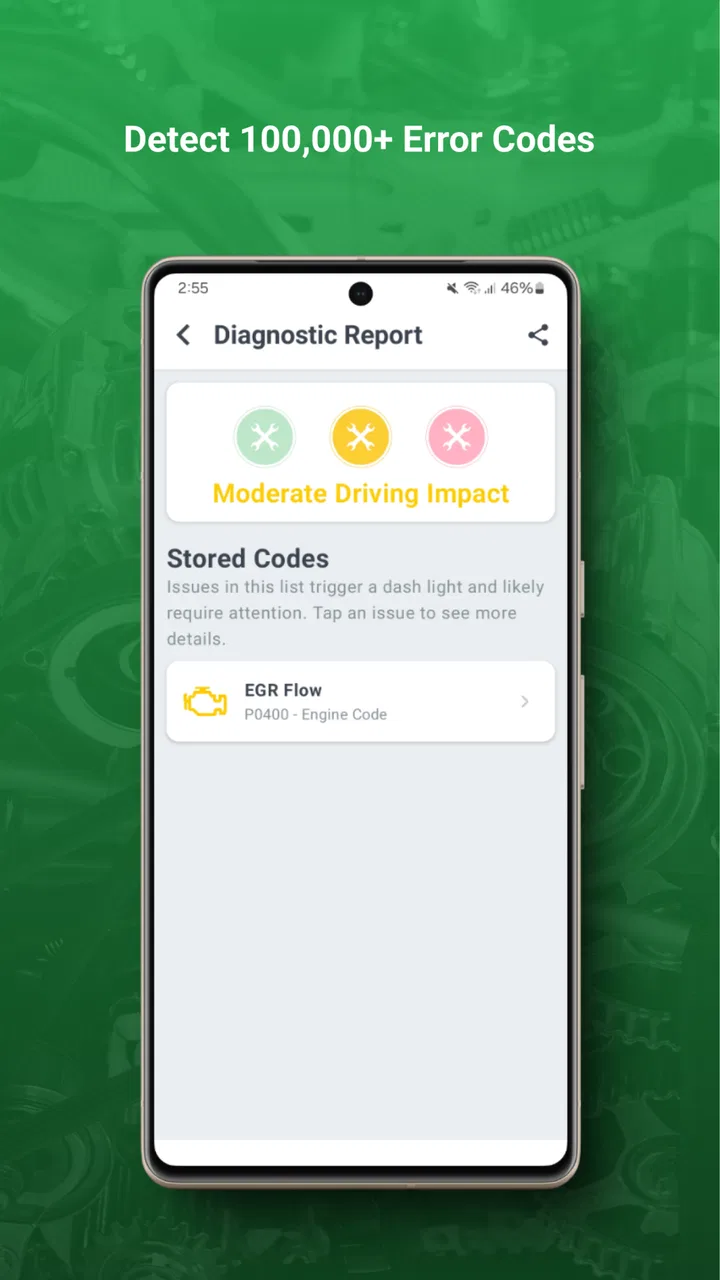
When a diagnostic code appears, resist the temptation to treat its wording as a final verdict. A code can point to a system or condition rather than identify the exact component that needs replacing. For example, an emissions-related alert may involve a loose cap, a sensor, wiring, a leak, or another underlying issue. The useful action is to record the code and its context, then ask a qualified technician what tests should confirm the cause.
This is where I see the app’s real value. It can help you arrive at a repair conversation with better information. Instead of saying only “the check-engine light came on,” you can explain when it appeared, whether the car felt different, and what the scan reported. That does not guarantee a cheaper repair, but it can make the conversation less confusing and help you recognize when a proposed fix does not obviously match the reported problem.
A particularly helpful habit is to take note of the vehicle’s behavior at the same time as the scan. Was the engine running roughly? Did the light appear after refueling? Did the car drive normally? Did the warning disappear and return? These details are not decorative. They can help separate a one-time event from a recurring issue and give the mechanic information that an isolated code cannot provide.
Where first-time users commonly get confused
The biggest misunderstanding is assuming that a diagnostic code equals a failed part. It does not always work that way. The app may tell you which area of the vehicle needs attention, but further testing is often necessary. I would never order an expensive replacement solely because a code description contains the name of a sensor or system.
Another confusion involves clearing a warning. Removing a code can make the dashboard look normal temporarily, but it does not repair the cause. It can also erase useful clues for the next person who examines the vehicle. My advice is to document the code and symptoms first, and only clear anything when you understand why you are doing it and what information may be lost.
Drivers also sometimes expect the app to explain every maintenance task in the same way for every vehicle. Cars differ by model, engine, mileage, service history, and equipment. A reminder can be useful as a prompt, but it should not replace the schedule in the owner’s manual or the records kept by your repair shop.
Connection trouble is another realistic source of frustration. The app depends on the scanner, the car’s connector, the phone, and the vehicle’s ignition state all cooperating. If it fails to connect, I would troubleshoot in a fixed order: reseat the scanner, confirm the car is powered as required, close and reopen the app, and check that I am attempting to connect to the intended vehicle. Changing several things at once makes it harder to identify the real cause.
There is also a privacy and practicality question that many new users overlook: leaving hardware connected all the time may not suit every vehicle or owner. I would follow the scanner’s instructions and remove it if the manufacturer or vehicle guidance suggests doing so. A connected accessory should not become an afterthought simply because the app is convenient.
What the free app offers and where costs enter
The app itself is free, which makes it easy to try without committing immediately to a paid service. However, in-app purchases range from under a dollar to just under one hundred and twenty dollars per item. That is a wide range, so I would read each purchase screen carefully and decide whether the added service matches the way I actually maintain my car.
This matters because a driver who only wants occasional help with a dashboard warning has different needs from someone who wants ongoing vehicle tracking, reminders, or broader ownership support. I would begin with the basic workflow: connect the scanner, identify the vehicle, read the available information, and see whether that process genuinely helps me. Only then would I consider paying for extras.
The free entry point is especially sensible for a first-time user who is comparing this with a basic handheld OBD2 reader. A handheld reader may be cheaper as a one-time tool and can be useful if you already understand codes or only need occasional readings. FIXD’s advantage is the phone-based experience and the possibility of keeping vehicle information in a more approachable format. The trade-off is dependence on compatible hardware, the app, and any paid functions you choose.
Compared with a mechanic’s professional scan equipment, this is a consumer-friendly first layer rather than a complete workshop platform. Professional tools can access deeper vehicle systems and support more advanced testing, depending on the vehicle and equipment. If the problem involves complicated electrical behavior, intermittent faults, safety systems, or a repair that requires physical inspection, a professional remains the better option.
Everyday situations where it earns its place
Imagine leaving work and seeing the check-engine light appear on the way home. The car feels normal, so you are unsure whether to stop immediately or continue cautiously. I would pull over safely, check the app while parked, and use the result as an initial risk signal rather than a final diagnosis. If the vehicle is running badly or the warning is accompanied by another serious symptom, I would prioritize roadside assistance or a mechanic instead of relying on the scan.
A second useful situation is buying a used car. A scan can reveal active diagnostic information that a quick visual inspection misses. I would use it before agreeing to a purchase, but I would not treat a clean scan as proof that the car is perfect. A seller could have recently cleared codes, and some problems do not present electronically. The best approach is to combine the app with a cold start, a road test, service records, and an independent inspection.
For a household with an older vehicle, the app can support a simple maintenance routine. After a warning appears, record the date, symptoms, and scan result. After a repair, check whether the original behavior returns. This creates a practical timeline that can help when the same issue comes back months later. The insight here is that the app becomes more valuable when paired with your own notes; a single scan is a snapshot, while repeated observations show a pattern.
It can also help a cautious driver avoid unnecessary panic. Some dashboard warnings are urgent, while others still require attention but do not mean the engine will fail immediately. The app can provide a starting point for sorting those situations, but I would always cross-check the warning behavior against the owner’s manual and professional advice.
Who should use it, and who should skip it
I think FIXD OBD2 Scanner is a good fit for drivers who want a friendlier way to understand car warnings, people maintaining an older vehicle, families sharing maintenance responsibility, and used-car shoppers who want an additional screening step. It is also a reasonable choice for someone who feels uncomfortable with technical codes but still wants to ask more informed questions at a repair shop.
I would skip it if you want a complete diagnostic workshop, advanced live testing, or a tool that can physically identify every mechanical failure. I would also hesitate if you dislike phone-based setup or do not want to buy and manage compatible scanner hardware. A simple handheld reader may suit you better if you only need occasional code retrieval and already know how to interpret the results.
It is not the right answer for urgent safety problems. Brake failure, steering trouble, overheating, smoke, fuel smells, severe vibration, or a rapidly worsening engine problem deserves immediate attention from a qualified professional. In those cases, the app may be useful later for documentation, but it should not be the first or only response.
My recommended path after the first scan
Once the first scan is complete, I would avoid endlessly checking the app without a plan. Write down the warning, the code or description shown, the vehicle’s symptoms, and the conditions under which the warning appeared. Then compare that information with the manual and contact a reputable repair professional when needed.
If the result points to a minor possibility, do not assume that “minor” means “ignore it.” Schedule the appropriate follow-up, especially if the warning returns. If the result is unclear, that is not necessarily a failure of the app; it may simply mean the vehicle needs tests that a phone-connected scanner cannot perform.
I would also review whether the app fits my normal ownership habits before considering an in-app purchase. If I only use it once a year, the free experience and a basic scanner may be enough. If I regularly manage several vehicles and appreciate having information organized in one place, the additional options may be more worthwhile. The best value depends less on the headline features than on how often I will actually use them.
Overall, FIXD OBD2 Scanner succeeds when it gives an ordinary driver a clearer first step. It makes vehicle diagnostics feel less mysterious, helps turn a warning light into a useful conversation, and can be reassuring during everyday ownership. Its limits are just as important: it reads electronic information, does not replace inspection, and should not be used to justify driving an unsafe car.
My honest recommendation is to treat it as a practical translator and record-keeping aid, not as an automated mechanic. If that matches what you want, the free installation makes it easy to begin. Set it up while parked, connect the scanner carefully, record what the car reports, and use the result to decide on the next sensible action. That is where this Auto & Vehicles app is at its best.
FAQs for FIXD OBD2 Scanner
01What vehicles are compatible with the FIXD OBD2 Scanner?
The FIXD OBD2 Scanner is compatible with all gas-powered vehicles built after 1996 and diesel vehicles built after 2008. It connects to cars using the OBD2 port, which is standard in most vehicles within these years. Before purchasing, ensure your vehicle supports OBD2 diagnostics.
02How do I set up the FIXD OBD2 Scanner with my smartphone?
Setting up the FIXD OBD2 Scanner is straightforward. Download the FIXD app from the Google Play Store or Apple App Store, plug the device into your vehicle's OBD2 port, and follow the in-app instructions to connect via Bluetooth. Ensure your smartphone's Bluetooth is enabled for a seamless setup.
03Can the FIXD OBD2 Scanner detect all types of car issues?
While the FIXD OBD2 Scanner provides extensive diagnostics, it primarily focuses on engine and emissions-related issues. It can detect over 7000 error codes, offering insights into problems like check engine lights, maintenance needs, and more. However, it may not diagnose non-engine related issues.
04Is there a subscription fee for using the FIXD app?
The basic features of the FIXD app are free to use. However, there is a premium subscription option that offers additional features such as enhanced diagnostics, unlimited repair cost estimates, and access to FIXD Mechanic Hotline for expert advice. Consider your needs when deciding on the subscription.
05What should I do if the FIXD OBD2 Scanner won't connect to my car or smartphone?
If you experience connectivity issues, first ensure that the device is properly plugged into the OBD2 port and your smartphone's Bluetooth is on. Restart the app, and if problems persist, consult the troubleshooting guide in the app or contact FIXD customer support for assistance.
Pros
- Easy to install and set up.
- User-friendly interface design.
- Real-time vehicle health updates.
- Compatible with most car models.
- Offers maintenance reminders.
Cons
- Limited advanced diagnostic features.
- Requires in-app purchases for full access.
- Bluetooth connection can be unstable.
- Not compatible with diesel engines.
- Data accuracy can vary with car model.

FIXD OBD2 Scanner
Gallery